Features
- Pinned sun salutation scene
- Weekly timetable colour-coded by class type
- Class types with levels and times
- Intro offer and price list
- Teacher profiles
- First visit guide
- Address, directions and front desk hours
Included Pages
Serene Yoga Template
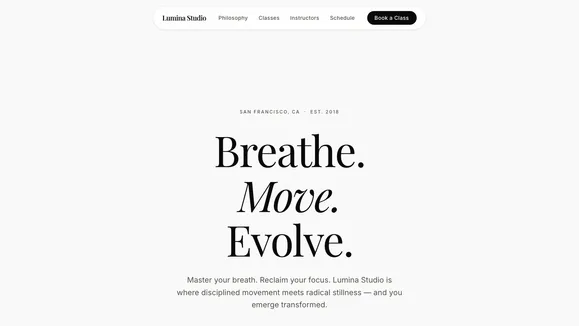
A one-page site for a neighbourhood yoga studio, with the weekly timetable, intro offer and class passes. Soft paper tones, and a pinned scene where a line-drawn figure flows through a sun salutation as the sun rises.
A yoga studio site that answers the first-timer's questions
Most people visiting a yoga studio's website want to know which class to try, when it runs, what it costs and what to bring. This one-page template answers each of those in turn, in a calm, warm layout. The sample site is Lumina Studio, a made-up neighbourhood studio upstairs on Valencia Street in San Francisco, with 26 classes a week across vinyasa, yin, beginners and prenatal.
The classes, teachers, prices and timetable are sample content. Replace them with your own schedule and studio details.
What is on the page
The hero opens with a short serif headline, a photo of a morning class and a small card listing this Saturday's classes. Two buttons lead to the intro offer and the timetable.
Classes describes the four class types, each with its length, level, a plain description and when it runs, beside two captioned photos.
Then the signature scene. A single figure drawn in fine lines stands on a mat. On a laptop or desktop the section holds while you scroll, and the figure moves through one full round of sun salutation A, pose by pose: mountain, upward salute, forward fold, half lift, low plank, upward dog, downward dog and back to standing with hands at heart. Beside it, each pose's English and Sanskrit name and its breath cue (inhale or exhale) fade in as the figure reaches it, while a sun rises behind the mat and the background slowly warms.
After that:
- Timetable: the whole week in seven columns, colour-coded by class type with a key, each class showing time, teacher and length
- Prices: a highlighted intro offer for new students next to a list of drop-ins, class packs, monthly unlimited, community class and private sessions
- Teachers: four teachers with a photo, what they teach and a short bio
- Your first class: a member quote and five short notes on what to bring, eating, showers, injuries and booking
- Visit: the address, how to get there, front desk hours, phone and email, with a link to directions
Who it suits
- Independent yoga studios
- Pilates and barre studios that run a fixed weekly timetable
- Meditation and breathwork centres
- Prenatal and postnatal yoga teachers
- Yoga teachers renting space who want a small, clear site
Frequently Asked Questions
How does the sun salutation look on a phone?
On phones the stage holds under the menu and the line-drawn figure flows through one round of sun salutation pose by pose, while the sun rises behind it. Visitors with reduced motion turned on see all eight poses side by side.
Can I change the sequence or the poses?
The pose names, Sanskrit names and cues are text you can edit or translate in the visual editor. The figure itself is a hand-tuned drawing for this sequence, so a completely different flow is a bigger change; describe it to the AI editor and it can redraw the poses. You can also switch the scene off in the editor.
How do students book a class?
The template has no booking system. The buttons lead to the intro offer and timetable, and the text points students to your booking app or front desk. If you use a booking service, ask the AI editor to point the buttons and timetable at its pages.
Is there a contact form?
No form is included. Students reach you by phone or email from the visit section. If you want one, ask the AI editor to add a contact form and it will connect it to Pagesmith's built-in form service.
How do I update the timetable each term?
Each class is one line with a time, name, teacher and type. Edit them in the visual editor, or paste your new schedule into the AI editor and ask it to replace the week.
Does it load quickly on mobile?
Yes. The figure is a light vector drawing, and photos below the hero load as you reach them. The finished template scored 98 to 99 for performance in mobile Lighthouse tests.
Ready to get started?
Use this template as your starting point and customize everything with AI. Your site will be live in minutes.
More templates
Wellness & Spa
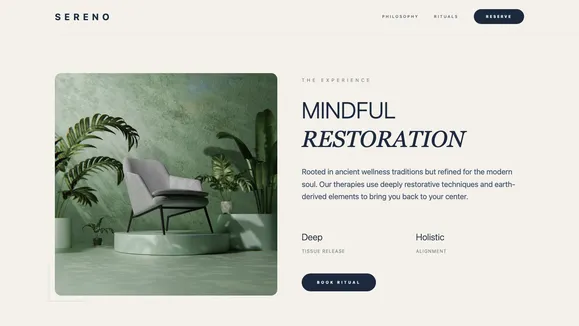
A warm, quiet website for a bathhouse, sauna or day spa. Its signature scene walks through the ritual of sauna, cold plunge and rest, with the photo, temperature and light changing as you scroll.
View template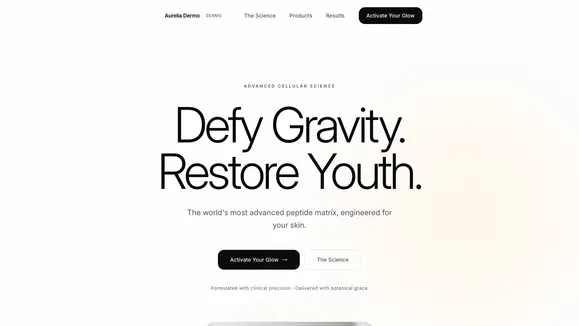
Aurelia Dermo
A clinical, minimal, and ultra-luxurious skincare template engineered for high-conversion wellness brands.
View template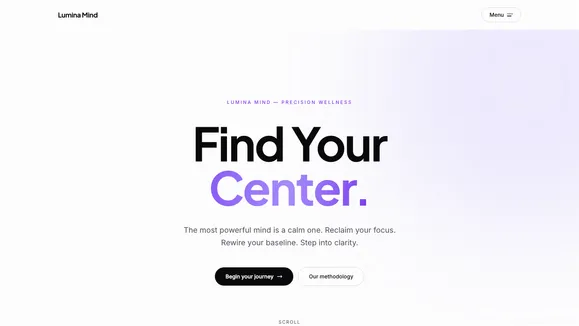
Lumina Mind
Master your mental space. Transform your reality. A premium, ultra-minimalist wellness template designed with clinical precision and luxury hospitality aesthetics.
View template