Features
- Pinned bouquet scene built stem by stem
- Bouquets with sizes and prices
- Order form with delivery date and card message
- Same-day delivery times and fees
- Flower subscription plans
- Wedding price list
- Workshop dates with seats and prices
Included Pages
Bloom Florals Template
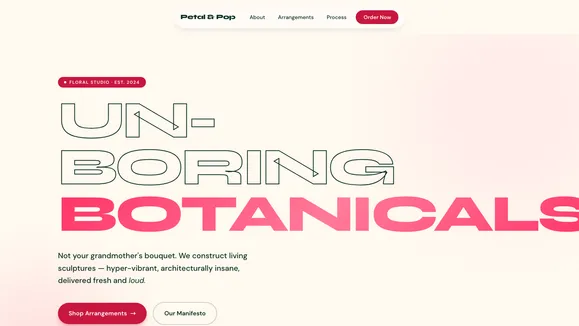
A bright, friendly site for an independent florist with same-day delivery. Priced bouquets, subscriptions, weddings and workshops, plus a scene where a bouquet is built stem by stem as you scroll.
A shop window for a neighbourhood florist
Built for florists who sell to walk-in customers, take delivery orders and do the odd wedding. The sample site belongs to Petal & Pop, a made-up flower shop on SE Division Street in Portland, Oregon, that delivers by cargo bike and van and promises flowers at the door by six if you order by 1 pm.
Shop name, bouquets, prices, delivery zones and photos are placeholders for you to replace with your own.
What is on the page
At the top, a big headline about seasonal flowers delivered the same day sits next to a photo of a florist tying a bouquet at the counter. Two buttons lead to this week's bouquets and to subscriptions.
The next section is the signature scene. On a desktop screen it stays in place while an empty stoneware jug fills up. Six kinds of stem drop in one at a time (eucalyptus, quince blossom, parrot tulips, ranunculus, anemones and hellebores), and each name lights up in a numbered list on the left with the months it is in season. When the last stem settles, the finished bouquet stands with its name, its price and an order button.
Further down:
- This week's bouquets, four cards with the flowers in each and small, medium and large prices
- Same-day delivery, with a bar that fills across the day from opening to last drop-off, delivery fees by area, and the order form
- Flower subscriptions, weekly, every two weeks or monthly, with the price per delivery and the rules for skipping or cancelling
- Weddings and events, with a couple's quote and a price list from bridal bouquets to ceremony arches
- Evening workshops with dates, times, seats and prices
- The shop address, opening hours, phone and email
Who it suits
- Independent florists with a shopfront and local delivery
- Flower subscription businesses
- Wedding and event florists who also sell day to day
- Flower farms that sell bouquets direct
- Plant and flower shops that run evening classes
- Gift shops that deliver flowers in their own area
Frequently Asked Questions
How does the bouquet scene look on a phone?
On phones and tablets the jug stays at the bottom of the screen, and each stem drops into it as its line in the list scrolls past. Visitors with reduced motion turned on see the finished bouquet in its jug with the six stems listed beside it.
Can I show my own bouquet in the scene?
Yes, but it needs a little preparation. The scene is made of one cut-out photo per stem on a transparent background, all taken from the same angle, stacked over a photo of the jug. Upload your own cut-outs in the visual editor, or ask the AI editor to replace the scene with a single photo of your bestseller. You can also switch the animation off in the editor.
Does the order form take payment?
No. The form collects the customer's name, phone, email, bouquet, delivery date, address and card message, and sends it to you through Pagesmith's built-in form service. The sample copy says the shop calls back within 30 minutes to take payment, which you can change to match how you work.
Can customers book workshops or weddings online?
The workshop and wedding buttons open an email to the shop with the subject filled in. There is no booking calendar. You can ask the AI editor to add a booking form if you want one.
Is the site fast enough for people ordering on their phone?
Yes. Photos are WebP in several sizes and load as they come near the screen. Our mobile Lighthouse runs of the finished template scored 99 for performance.
How do I change prices and delivery fees each season?
Click any price, bouquet name or delivery fee in the visual editor and type the new one. For bigger changes, such as adding a Valentine's range, you can describe it to the AI editor.
Ready to get started?
Use this template as your starting point and customize everything with AI. Your site will be live in minutes.
More templates

Construction & Renovation
A photo-led site for a residential builder that does extensions, loft conversions and renovations, with real budgets and timelines. Its pinned before-and-after kitchen scene reveals the finished room as you scroll.
View template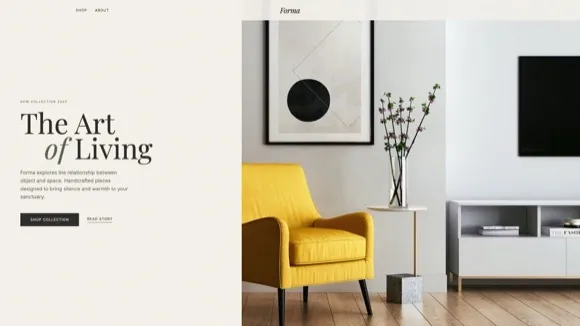
Design Furniture Luxury
A calm, Scandinavian-style site for a furniture and homeware brand. Named pieces with designers and prices, materials, showroom and trade program, and a scene that zooms into a chair's joinery as you scroll.
View template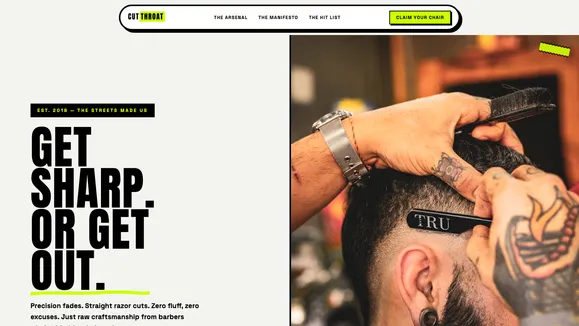
Cutthroat & Co. Barbershop
A dark, photo-led site for a neighbourhood barbershop. Barbers with specialities, walk-in and booking rules, opening hours and a booking form, with a price list that flips into place like an old station board.
View template