Features
- Pinned inbox zero task list scene
- Grouped list of tasks an assistant handles
- Three hourly plans with prices
- Three-step matching process
- Assistant profiles with languages
- Security and confidentiality rules
- FAQ accordion and intro call form
Included Pages
Task Flow VA Template
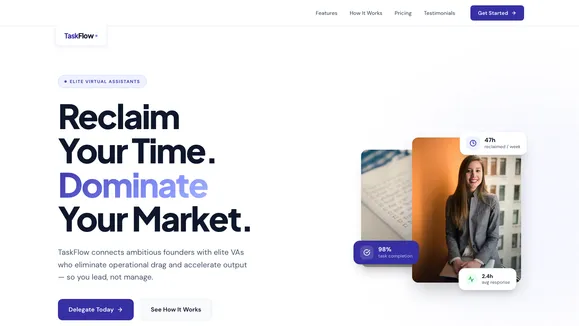
A one-page site for a virtual or executive assistant service, with hourly plans, named assistants and clear security rules. Crisp and calm, with a pinned task list that ticks itself off until the inbox is empty.
For assistant services that need to earn trust fast
Hiring a remote assistant means handing a stranger your inbox, calendar and card details. A good website has to show what the work looks like, what it costs and how private information is kept safe. This template does all three on one page. The sample site is TaskFlow, a made-up Amsterdam service that matches founders and small teams with experienced remote executive assistants across Europe.
The assistants, clients, tasks and prices are sample content. You replace them with your own team, plans and rules.
What is on the page
The hero makes one plain promise, with buttons to book an intro call or see prices, three short facts about matching, confidentiality and flexibility, and a portrait of one of the assistants.
Then the signature scene: one real-looking morning of an assistant's work. A clean task panel lists seven jobs for one founder, such as rescheduling an investor call, booking flights to Lisbon and chasing an overdue invoice, each with the request and the result. On a laptop or desktop the section holds while you scroll, and each task is ticked in turn: the check fills, the line is struck through and the row slides up out of the list. When the last one goes, the panel shows "All done. Maya handled 7 tasks today." with a note that the summary was sent.
The rest of the page:
- What your assistant takes off your plate: six groups (calendar, inbox, travel, finance admin, projects, personal) with four examples each
- Plans: 20, 40 and 80 hours a month, each with a monthly price, the hourly rate it works out to and what is included
- How matching works: an intro call, meeting two assistants, then a two-week start, beside a photo
- Assistants: four profiles with city, background and languages
- Client quotes from three named founders
- Security: six rules covering NDAs, password vaults, two-step login, background checks, EU data and removing access
- A question and answer list that opens one answer at a time
- An intro call form with contact details
Who it suits
- Virtual and executive assistant agencies
- Freelance personal assistants
- Remote operations and admin support firms
- Bookkeeping or admin services sold by the hour
- Concierge and lifestyle management services
Frequently Asked Questions
What does the task list do on a phone?
On phones and tablets the task panel's header stays under the menu, and each of Maya's seven tasks is ticked off as its row passes the middle of the screen, ending on "All done". Visitors with reduced motion turned on see the finished list straight away.
Can I change the tasks in the scene?
Yes. Each task has a title, the request, the result and a tag such as Travel or Finance, all plain text in the visual editor. Change them to the kind of work your assistants do, or ask the AI editor to add or remove rows. The scene can also be switched off in the editor.
Where do intro call requests go?
The form posts to Pagesmith's built-in form service. You get an email with the visitor's name, work email, company, the plan size they picked and what takes up their week.
Can clients sign up and pay for a plan online?
No. All plan buttons lead to the intro call form, because assistant services usually start with a conversation. If you want online sign-up, the AI editor can link the buttons to your payment or scheduling tool.
How do I edit the questions and answers?
The FAQ is a list of questions and answers on the page. Edit the wording in the visual editor or ask the AI editor to add questions your clients often ask.
Is the template fast?
Yes. The task panel is built in HTML, and there are only a handful of photos. The finished template scored 99 to 100 for performance in mobile Lighthouse tests.
Ready to get started?
Use this template as your starting point and customize everything with AI. Your site will be live in minutes.
More templates
Construction & Renovation
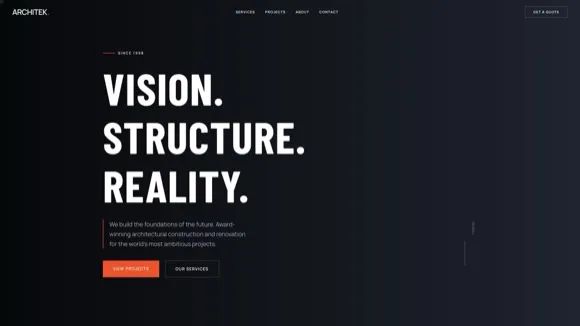
A photo-led site for a residential builder that does extensions, loft conversions and renovations, with real budgets and timelines. Its pinned before-and-after kitchen scene reveals the finished room as you scroll.
View template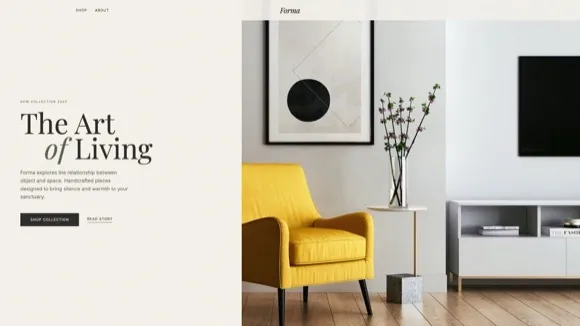
Design Furniture Luxury
A calm, Scandinavian-style site for a furniture and homeware brand. Named pieces with designers and prices, materials, showroom and trade program, and a scene that zooms into a chair's joinery as you scroll.
View template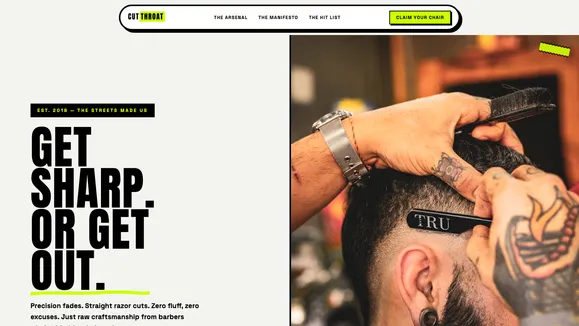
Cutthroat & Co. Barbershop
A dark, photo-led site for a neighbourhood barbershop. Barbers with specialities, walk-in and booking rules, opening hours and a booking form, with a price list that flips into place like an old station board.
View template